If you find yourself always looking for new recipes online, browsing the food section of Pinterest, bookmarking food blogs, shooting pictures, and/or a Food Network fan, maybe its time you start your own food blog! Here are just three simple steps to starting your own website:
Step 1) Pick an Awesome Domain Name and Get Web Hosting!
Once you have decided on starting your food blog, the first thing you have to do it sit down and brain storm a few domain names [www.yourdomainname.com], since this will be the most important feature of your website. You want to make it easy to remember and unique. This part may take you a few days, but once it pops in your head, you’ll know that’s the one!
Once you have your list of domain names for your food blog, now you need to check if they are available on potential hosting websites (usually web hosting companies offer free domain names if you purchase a plan). Check in their search box to see if your domain is available.
OK, so let’s talk web hosting… I have been through 3 hosting companies, all with terrible support and a lot of downtime, so I was so grateful when I found InMotion Hosting! I have been using them for 3 years now, and do not have one complaint. They have an excellent support team via chat or phone to help you with any problem with your website, and my server is never down.
 InMotion Hosting has great pricing for basic hosting and VPS hosting (good for higher traffic, so you may need to upgrade eventually!), and they have a dedicated support team that is there whenever you have issues with your site! In addition, for signing up with them you get $250 in ad credits to promote your site. WordPress installation is made easy through the cPanel.
Step 2) Get WordPress – Your New Best Friend
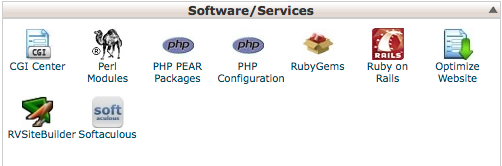
WordPress is the CMS (content management system) platform I use for my food blog, and I have tried Blogger and others and I must say WordPress surpasses all of the rest. The easiest way to set it up is through your web hosting cPanel* (most web hosting companies use cPanel these days). Log in, then go to the Software/Services section and click “Softaculous“. On the lefthand side menu click on “blogs” and then “wordpress”. Click “install” at the top, and follow the prompts until you are all set up! Write down your WordPress login information because you will need it to access your blog at www.yourdomainname.com/wp-admin.
*If your host doesn’t offer install through cPanel, not to worry – this WordPress installation guide is all you need to get started.
Step 3) Design and Go!
Once WordPress is installed, search for a theme. There are thousands of free themes available, and you can pay for premium themes which have more features. Once you have found the perfect theme you want, go into the settings to change the colors and fonts (some themes do not have this option, and you have to know a little CSS to code in what you want to change the appearance of your blog…there are tons of CSS tutorials on the web).
Search WordPress plugins, such as social bookmarking buttons and others to spice up your new blog.
Now you are ready to start blogging away…almost!
Other resources you’ll need:
A camera: I cannot afford a DSLR, so I currently use a point & shoot digital camera with high megapixel capabilities (12mp). Update: I now own a DSLR (Sony Alpha SLT-A57
Photo editing software: If you don’t have photoshop or another similar photo editing software, I highly recommend GIMP, a free opensource photo editing software. I currently use Adobe Lightroom.
A cookbook: Start trying out those recipes to share!
Finally…
Come back and link up to your new blog so I can check it out! Good luck, and you can always ask me questions on the My San Francisco Kitchen facebook page.
Disclosure: Some of the links on this page are affiliate links. All products I endorse on this page or products I use myself, and I am genuinely recommending them. All opinions are my own.
This is my first time hearing about Softaculous. I will have to look into it. Thanks for all the great info and advice.
Where do I go once I get to webhosting pad? Do I need to sign up to search domain names? This was super helpful…. Thanks 🙂
I figured it out 🙂
I can already tell that’s gonna be super hellufp.
Quick question – for the Webhosting Pad + Softaculous method, do you end up with a domain mapped WordPress.com site or is it a full-fledged WordPress.org site? I’m currently using dot com with its built-in domain mapping services (WP even manages your domain renewal!), so I’m curious to see if Webhosting Pad has what I need in terms of migrating to dot org. :3 Thanks!
Hi Alice!
So after brushing up on some reading (http://en.support.wordpress.com/com-vs-org/) my answer is that if you transfer over to a web hosting company independent from WordPress.com, you will use WordPress.org. There is no domain mapping….think of WordPress now as just a software program you install, as it is no longer related to your domain name or hosting at all. I used WordPress.com in the beginning and used the domain and mapping functionality too, but when you switch to an independent host you no longer do that, you just manage it on your own. Most common web hosting companies (including webhosting pad) offer something in the control panel where you can easily “install” WordPress (meaning upload all the core and theme files you need to your FTP files). Am I going off a tangent or did that answer your question??
Hi! I am aware that there two “divisions” of WordPress. There is one called the WordPress.com and another WordPress.org. I have learned that the .com one is free but has some restrictions on certain features. However, the .org one you must pay for & are allowed more features. I wanted to ask which one you use?
I am interested in starting my own blog and wondered about how much it costs to start-up. Thanks!
Hi Lauren!
I do not use either, I have independent web hosting and I just use WordPress.org for my CMS (content management system) – if you go this route, you pay for independent web hosting and can install WordPress for free through your host in your control panel.
It depends what you want – I would read about it here: http://en.support.wordpress.com/com-vs-org/
In terms of cost, domain names usually are around $10 (but can be more), and for good hosting you are looking at about $7/month at the cheapest. Sometimes companies have special promotions, so shop around before you decide on one!
Hope that helps.
Thank you for this! I am just starting a blog, tonight as I type this. I’m worried about getting traffic, but either way I’ll be doing something I love, so I’m really excited!
Traffic will come with time 🙂 It is so much fun, let me know how it goes!
So far, I just feel like a computer programming flunkie. So overwhelmed. 🙁 I don’t know how to write code, I just wanted to type my blog and post photos.
Hi I’m gee to this! I have been wanting to start a food blog for quite some time but I just didn’t know how to go about it. This is really great information. What is the startup cost on a food blog page? Can you put the page on Facebook and other sites because I have written and published two family cookbooks and have been in the food industry for over 20 years. Thanks for your help!
thanks for all this info… you probably created this a long time ago but this was helpful to me now 🙂 I agree thinking of a name does take a few days but when it came to me I knew that was it and tastearoo.com was born! thanks again!
Great article! My colleagues and I are starting a food blog at the moment, but we also plan to expand it on food-related themes as well. I see we have missed a couple of the plug-ins which are recommended here, mainly Easy Recipe. Is it compatible with the latest version of WordPress?
Hi Kristianne
Love your content and the way you just make complex into simple. I am just starting a blog too, so, wish me luck 🙂
Thanks good luck!